Three things off your plate.
Every CPA we talk to says the same thing first: make my life easier. So instead of telling you about CPA Hub, we’ll let you use it. Scroll down and you’re working the same screen your staff would use, on a sample W-2. Nothing to sign up for.
Stop retyping tax forms. Check them.
CPA Hub reads the forms your clients upload. You check what it read with the document right beside it — every figure points to where it is printed on the page, and a figure that isn’t printed there says so. A brokerage statement that holds three tax forms is read as three, each checked on its own. The reader got one figure on the W-2 wrong. Find it.
- 1Open the W-2. The reader was unsure of one figure - find it on the page and put it right.
- 2Press Enter through the figures, then Verify & release.
- 3Open the brokerage statement: one document, three tax forms, each checked on its own tab.
This is CPA Hub’s own check screen, running in your browser on two made-up documents. Nothing you do here is sent anywhere. Their EINs start with 00, a prefix the IRS has never issued, so no real business’s number is shown — and that is why the check flags them.
Bill the minute the work is done. Get paid without chasing.
No month-end billing run. The work is done, the invoice goes out — and your client can pay it from their phone before they’ve put it down. Try it: bill a client’s time, send it, and pay it the way they would.
Loading the invoice screen…
- Turn a client’s unbilled time into an invoice in one click — or build one by hand.
- Send it straight away by email with a pay button, or copy the pay link and text it.
- A cheque or cash in the door? Record it and the balance stays right. Part-payments too.
- The owner’s dashboard shows what you have actually collected this year — money in the bank, not money billed.
- No login and no account to make. They open the link and pay.
- Card, Apple Pay or Google Pay — plus bank transfer, Link, Cash App Pay, Amazon Pay and more: whichever ways your firm switches on in its own Stripe account.
- Already paid part of it? They are only asked for what is left.
- The money goes straight to your firm’s own account, and the invoice marks itself paid.
CPA Hub takes no cut of what your clients pay you. Stripe’s standard processing fees apply.
Your security plan, done — and kept current.
Every tax firm needs a Written Information Security Plan. CPA Hub builds yours with you and keeps it up to date as your staff, vendors and training change. Its first page is the one an examiner reads first: what is in place, and what you would have to explain today.
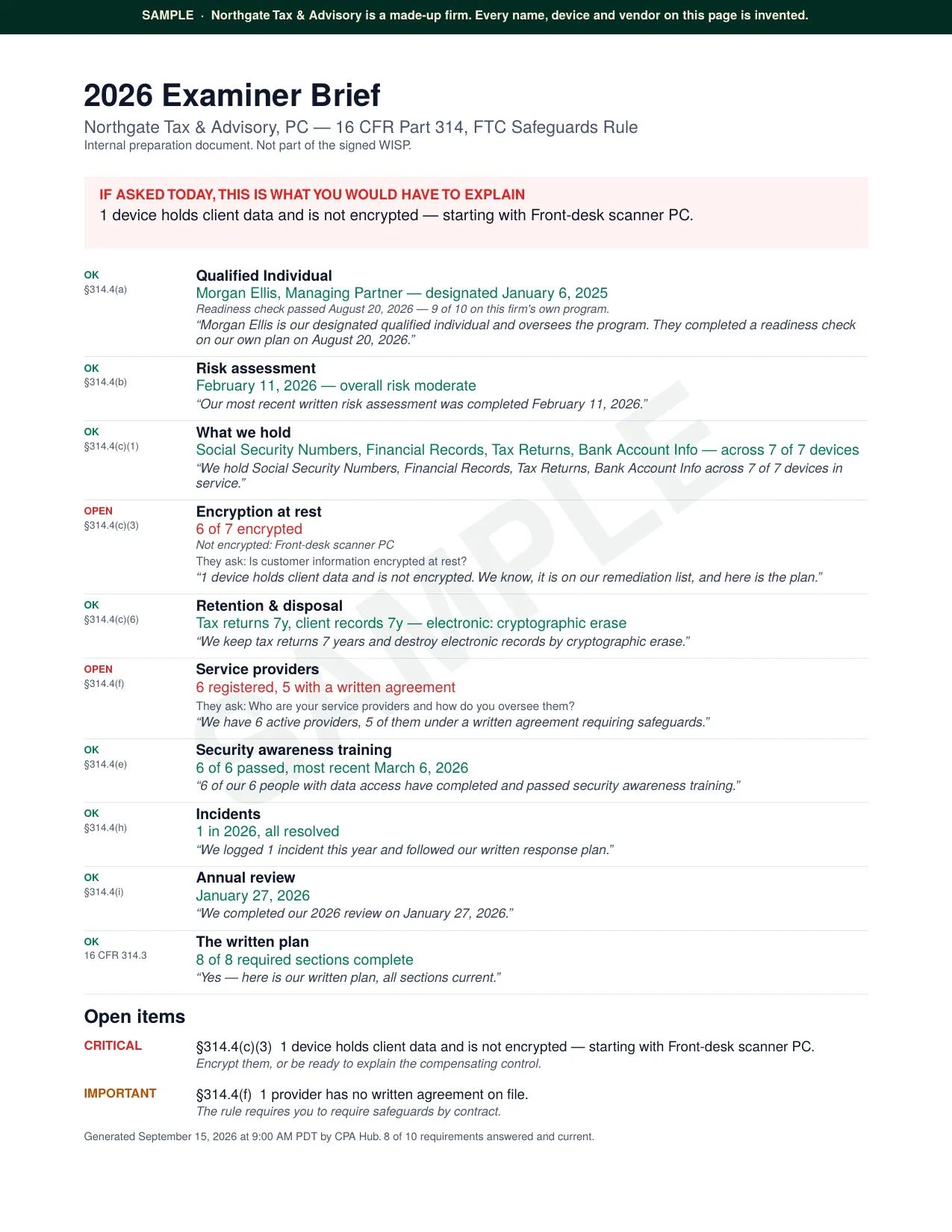
A sample for a made-up firm. Open the full page.
Rather write? Tell us what you would change: [email protected]